3DVirtualBox1.0
Publisher Description
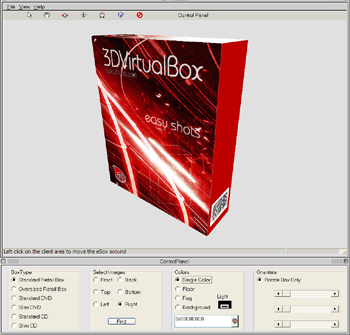
You can grab your customers attention by creating an emulated physical box. Keep your distribution completely digital and also save on expensive graphics programs to generate a "Real" presentation of your products.
.Features and Benefits:.
Easy manipulation of the 3D models.
User interface is the easiest to use!!!
Easy intuitive process.
Save images to BMP files directly to your directory.
Single color Backgrounds or add a floor and fog for a nice effect.
Apply Lighting
Create stunning box shots in seconds
Pose and position your box shot exactly how you want, not just in some arbitrary manner
Create unique and innovative looking box shots
Make full size screen shots as well as tiny thumbnails
Rapidly prototype your box designs in real time
Adding box shots to your site can improve sales and conversion rates
A good quality box shot can make your product more attractive to affiliates, publishers and resellers.
About 3DVirtualBox
This program is available in English. It was last updated on 29 September, 2026. 3DVirtualBox is compatible with the following operating systems: Windows.
The company that develops 3DVirtualBox is spicybyte.com. The latest version released by its developer is 1.0. This version was rated by 2 users of our site and has an average rating of 4.0.
The download we have available for 3DVirtualBox has a file size of 2.1 MB. Just click the green Download button above to start the downloading process. The program is listed on our website since 2006-01-02 and was downloaded 591 times. We have already checked if the download link is safe, however for your own protection we recommend that you scan the downloaded software with your antivirus. Your antivirus may detect the 3DVirtualBox as malware if the download link is broken.
How to install 3DVirtualBox on your Windows device:
- Click on the Download button on our website. This will start the download from the website of the developer.
- Once the 3DVirtualBox is downloaded click on it to start the setup process (assuming you are on a desktop computer).
- When the installation is finished you should be able to see and run the program.
